Install the Aqua-Scope App
The Aqua-Scope App is a Progressive Web App (PWA). This means it is not installed through an app store but directly via your browser. After installation, the app behaves like a regular app on your home screen — with its own icon, full-screen mode, and offline functionality.
You can access the app at: app.aqua-scope.com
This is the only app for Aqua-Scope devices. Other apps in the app stores that may have the same name will not work.
What is a PWA?
A Progressive Web App is a website that can be installed like a native app. Benefits:
- No app store required — install directly from your browser
- Always up to date — updates are loaded automatically
- Low storage usage — significantly smaller than native apps
- Cross-platform — works on Android, iPhone, tablet, and PC
Installation on Android
- Open Chrome on your Android device.
- Navigate to app.aqua-scope.com.
- Tap the three-dot menu (⋮) in the upper right corner.
- Select "Add to Home screen" or "Install app".
- Confirm with "Install".
- The app now appears as an icon on your home screen.
If the "Install app" option is not shown, make sure you are using Chrome and not the in-app browser of another application.
Installation on iPhone / iPad
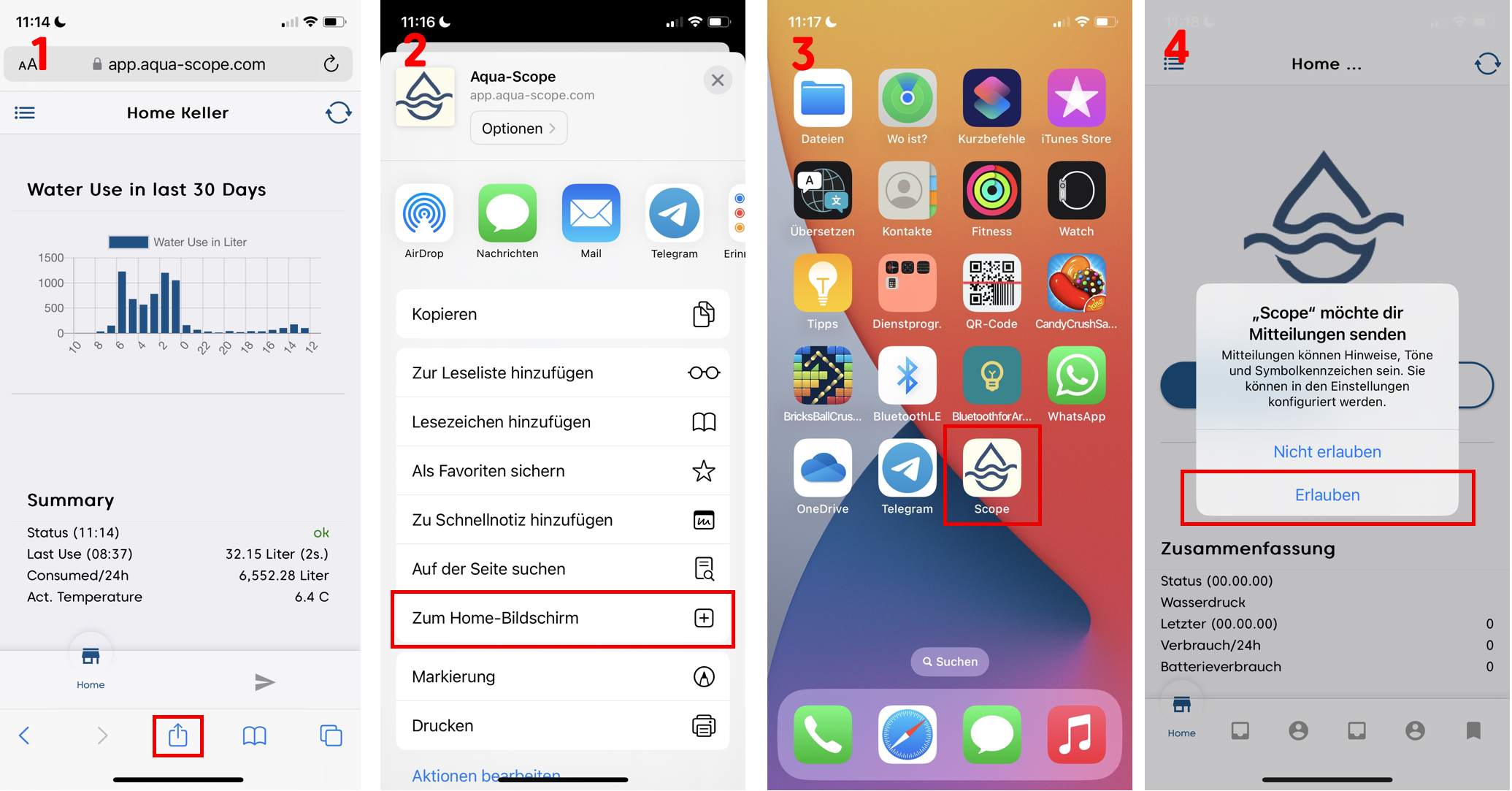
- Open Safari and navigate to app.aqua-scope.com (Image 1)
- Tap the Share icon (square with upward arrow) and select "Add to Home Screen" (Image 2)
- The app appears as an icon on your home screen (Image 3)
- Allow notifications to receive alarm alerts (Image 4)
On iPhone, PWA installation only works with Safari. Chrome, Firefox, and other browsers on iOS do not support this feature.
Installation on PC
- Open Chrome or Edge on your computer.
- Navigate to app.aqua-scope.com.
- Click the install icon in the address bar (small monitor icon or ⊕).
- Confirm with "Install".
- The app opens in its own window and can be launched from the Start menu or desktop.