BVSLWE01 – Nachrüstbarer Motor für Kugelhahn (LoRaWAN)
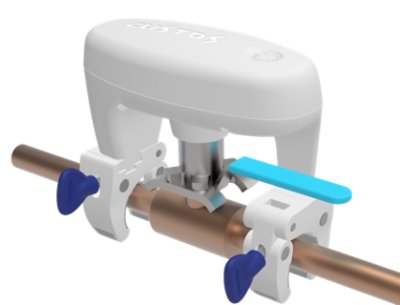
Produktbeschreibung
Dieser Motor rüstet bestehende Kugelhahnventile zu intelligenten Wassersteuerungseinrichtungen um. Ein innovativer Klemmmechanismus ermöglicht die Installation innerhalb von Minuten ohne zusätzliche Werkzeuge an Absperrhähne mit Rohrdurchmessern zwischen 0,5 und 1,5 Zoll. Eine patentierte Kupplungsmechanik liefert bis zu 8 Nm Drehmoment, um selbst bei rostigen und alten Ventilen zu funktionieren.
Hauptmerkmale:
- Wasser- und schmutzgeschützt (IP66) bis zum Netzteil, verwendbar in feuchten, schmutzigen und Außenbereichen
- Automatisches wöchentliches Ventiltraining: eine Schließ-/Öffnungsbewegung (1/8 Umdrehung) entfernt Ablagerungen im Ventil
- Drehwinkelmessung und Endpositionserkennung
- Langsame Anfahrt der Endpositionen zur Minimierung der Reibung
- Externes 12-V-Netzteil über wasserdichten Stecker
- Optionaler kabelgebundener Leckagesensor anschließbar
- Steuerung über lokale Taste oder LoRaWAN (Class C)
- Betrieb ist LoRaWAN-abhängig
Installation
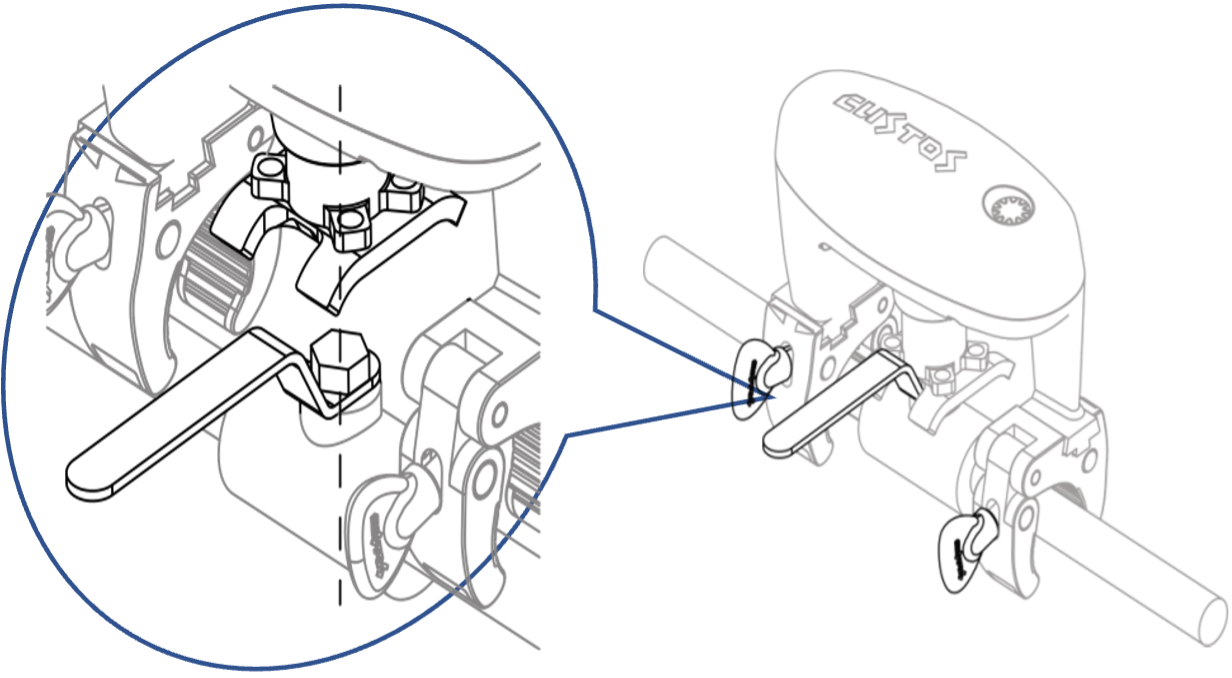
- Gerät vom Strom trennen
- Richtige Gabelseite passend zur Ventilgriffbreite wählen
- Sicherstellen, dass Spannknöpfe und Griff in entgegengesetzte Richtung zeigen (der Griff muss sich frei bewegen können)
- Klemmen von Hand anziehen, dabei das BVS festhalten
- Optional: Staubschutzhaube entfernen und lokalen Wassersensor anschließen
- Gleichstromadapter an das BVS-Stromkabel anschließen, Wasserdichtung festziehen
- Netzadapter in 230-V-Steckdose stecken
Anpassung der Rohrklemmen
Die Rohrklemmen sind im Auslieferungszustand in der Mitte der Halterung positioniert. Sie können nach rechts oder links verschoben werden, indem sie ohne am Rohr zu sein ganz zugedreht werden. Durch das Verschieben werden sie an verschiedene Rohrdicken angepasst.
Für noch größere Rohre können die Klemmen durch ein Paar größerer Klemmen mit SKU BVSCMP01 ersetzt werden (im Shop erhältlich). Damit ist ein Betrieb an Rohren bis 2 Zoll möglich.
Kalibrierung
Das Gerät misst den Drehwinkel und die Endpositionen des Griffs, um die Endpunkte sanft anzufahren und mechanische Belastung zu vermeiden. Jedes Mal, wenn das Gerät mit Strom versorgt wird, führt es zunächst einen Kalibrierungslauf durch.
Ablauf: Taste einmal drücken, um den Vorgang zu starten. Beobachten Sie die Griffbewegungen. Nach 10–20 Sekunden ist das Gerät betriebsbereit.
Die Kalibrierung erfordert, dass das BVS an einem Kugelhahn montiert ist. Ohne Ventil bricht die Kalibrierung ab und die Griffbedienung (Taste und Funkbefehl) ist deaktiviert.
Externer Wassersensor
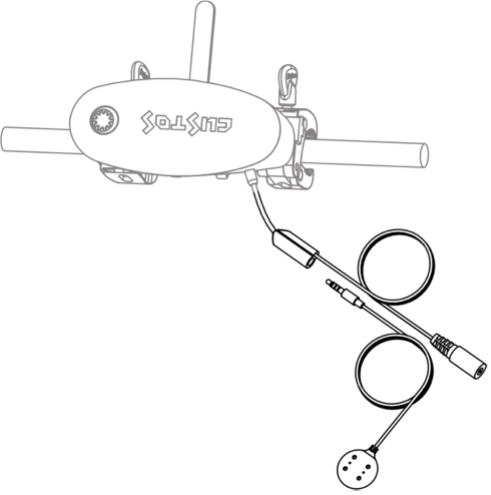
Optionaler kabelgebundener Wassersensor. Die Buchse befindet sich am Netzkabel neben dem Motor.
- Blaues/weißes Schutzpolster entfernen
- Sensor fest einstecken (fester Druck stellt wasserdichte Verbindung sicher)
Bei Wassererkennung:
- Überschwemmungsalarm wird ausgelöst, LED blinkt rot
- Je nach Parameter 8: Ventil schließt automatisch oder behält aktuelle Position bei
- Alarm löschen: Taste 2 Sekunden halten oder per LoRaWAN-Befehl
Der Flutsensor kann mit einer 1,5-m-Verlängerung ALIEXT01 (im Shop erhältlich) verlängert werden.
Manuelle Bedienung
Das Gerät besitzt eine einzelne Taste mit eingebauter dreifarbiger LED.
- Kurzer Klick: Ventil schalten (Auf/Zu)
- Mehrere Sekunden halten: Dauerhafter Betrieb (das BVS hilft beim Zählen der Sekunden, indem es jede Sekunde piept)
- 2 Sekunden halten (2 Pieptöne): Alarm deaktivieren
Das Gerät ist für den Außeneinsatz konzipiert und muss Fehlfunktionen durch Wassertropfen verhindern. Drücken Sie die Taste daher bitte fest, auch wenn Sie nur kurz klicken.
LEDs
| LED | Bedeutung |
|---|---|
| Grün langsam blinkend | Ventil offen (über App deaktivierbar) |
| Rot langsam blinkend | Ventil geschlossen (über App deaktivierbar) |
| Rot/Grün blinkend | Motor bewegt sich |
| Rot blinkend oder rot permanent | Alarm |
| Rot dreifach blinkend | Motor blockiert |
| Grün blinkend | Verbindet sich mit dem LoRaWAN-Netzwerk |
LoRaWAN-Kommunikation
Siehe LoRaWAN-Verbindung für Einrichtung, Schlüssel, JOIN/Rejoin-Verhalten, TTN-Integration und das vollständige Daisychain-Protokoll mit allen Uplink-/Downlink-Befehlen.
Unterstützte Sensortypen
| ID | Sensor | Einheit | Beispiel |
|---|---|---|---|
0x01 | Temperatur | 1/10 °C (Zweierkomplement) | 0x00CD = 20,5 °C; 0xFFEA = −2,0 °C |
Alarmtypen
| ID | Alarm | Wert |
|---|---|---|
0x01 | Flutsensor ausgelöst | 0x01 (aktiv) / 0x00 (inaktiv) |
0x02 | Frostgefahr | aktuelle Temperatur |
0x03 | Temperatur außerhalb Grenzwerte | aktuelle Temperatur |
Konfigurationsparameter
Alle Parameter sind 16-Bit-Werte.
| Nr. | Parameter | Standard | Bereich / Beschreibung |
|---|---|---|---|
| 1 | Status-Intervall | 0x0015 (15 Min.) | 0x0005–0x10E0, Berichtsintervall in Minuten |
| 2 | Message Type | 0x01 | 0x01=confirmed, 0x00=unconfirmed |
| 3 | Temperatur-Einheit | 0x00 | 0x00=Celsius, 0x01=Fahrenheit |
| 4 | Alarm-Wiederholung | 0x0301 | MSB=Anzahl Wiederholungen (Standard 3), LSB=Intervall in Minuten (Standard 1) |
| 5 | Ventiltraining | 0x0107 | MSB=aktiviert (0x01) oder deaktiviert (0x00), LSB=Intervall in Tagen (1–30); Standard: wöchentlich |
| 6 | Lokale Anzeige | 0x0101 | MSB=LED (0x01=aktiv), LSB=Buzzer (0x01=aktiv) |
| 7 | Temperatur-Schwelle | 0x000a | Änderungsschwelle in 0,1 °C (Minimum 0x000a = 1 °C) |
| 8 | Auto-Schließen bei Flut | 0x00 | 0x00=nicht schließen, 0x01=schließen; Alarm wird immer gemeldet |
| 9 | Buzzer bei Join | 0x01 | 0x01=Ton bei Server-Join, 0x00=stumm |
Lieferumfang
- Motor mit Anschlusskabel
- 1x drahtgebundener Wassersensor
- 12-V-Netzteil
Technische Daten
| Parameter | Wert |
|---|---|
| Physikalisch | |
| SKU | BVSLWE01 (EU) |
| Abmessungen | 148 x 96 x 133 mm |
| Gewicht | 603 g |
| Farbe | Weiß |
| Max. Drehmoment an Kopplungsgabel | 7 Nm |
| LoRaWAN | |
| Modul | SX 1261 |
| Frequenz (EU) | 868,42 & 869,85 MHz |
| Aktivierung | OTAA |
| Klasse | C |
| Version | 1.0.2 |
| Zubehör & Schnittstellen | |
| Wassersensor | Lokale Sensorsonde |
| Temperatursensor | MCP9700x (-40 °C bis +125 °C / -40 °F bis +257 °F) |
| Taste | Wassergeschützter Touchbutton |
| Indikator | Dreifarben-LED (Grün, Gelb, Rot) |
| Buzzer | Max. 85 dB |
| Stromversorgung | |
| Eingangsspannung | AC (110 V 60 Hz / 220 V 50 Hz) oder DC (12 V / 1 A) |
| Standby-Verbrauch | ~10 mA @ 12 VDC = 0,12 W |
| Motorbewegung max. | ~700 mA @ 12 VDC = 8,4 W |
| Umweltbedingungen | |
| Versand/Lagerung | -30 °C bis +70 °C |
| Betrieb | -20 °C bis 60 °C |
| Schutzgrad | IP66 (bis zum Netzteil); Netzteil IP20 |
| Zolltarifnummer | 85011093900 |