DRYLWE02 -- LoRa Wireless Remote Control (Dry Contact Controller)
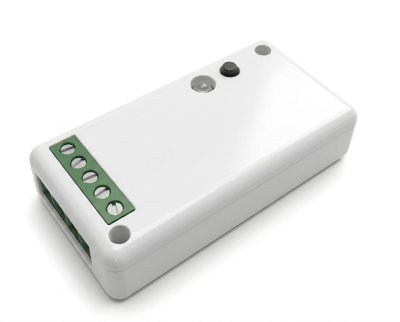
Product Description
This device enables control of an Aqua-Scope motor via dry contacts over LoRa radio, even when no direct wired connection is possible. A stable LoRa Direct link extends the control signal to the motor.
The device processes an input signal to control the motor and provides an output signal that indicates the current motor status.
- Input signal (I): Controls the motor (closed = motor closes, open = motor opens)
- Output signal (O): Reports current motor status (open-collector, up to 800 mA)
- Power supply: 3--30 V DC via screw terminal or USB-C
- Serial interface (USB-C) for AT commands and configuration
Never use both power supplies (USB-C and screw terminal) simultaneously -- this can destroy the electronics!
LoRa Direct
LoRa Direct enables direct radio communication between Aqua-Scope devices — no network server, gateway or infrastructure required. Details: LoRa Direct.
This device can therefore only be used for direct communication with other Aqua-Scope devices. The respective devices must be paired with each other, which is done either via the Aqua-Scope App or by pressing buttons.
For every LoRa Direct device, there is also a corresponding LoRaWAN device that can be used directly in a LoRaWAN network.
Installation and Usage
If the device is purchased together with a motor (KFRDRY02 or BVSDRY02), the motor and controller are already paired and immediately ready for operation.
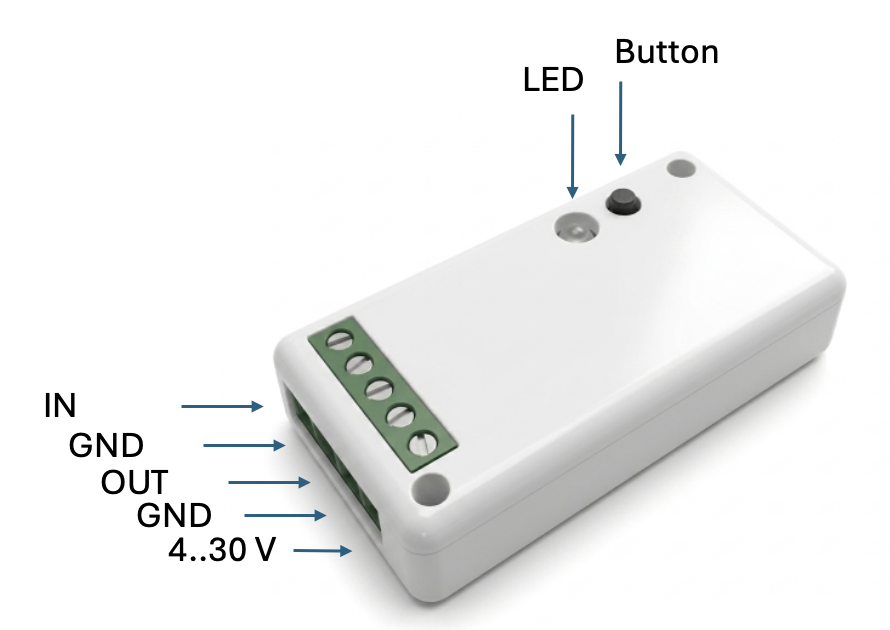
Screw Terminals / Power Supply
Power supply via USB-C or 3--30 V DC:
| Terminal | Function |
|---|---|
| V | Supply voltage (+) |
| G | Ground (-), common reference potential |
| I | Input: Control signal. Closed to G -- motor closes. Open -- motor opens |
| O | Output: Open-collector, indicates current switching state. Up to 800 mA to ground |
LED States
| LED | Meaning |
|---|---|
| Red/green flashing | No motor paired |
| Solid yellow | Motor paired, no status signal received yet |
| Solid red | Valve closed |
| Solid green | Valve open |
Pairing with Motor
For the KFR motor:
- In factory state, the LED flashes red/green (no motor paired)
- On the motor, press the button twice briefly
- Flashing stops -- connection established
If a motor is already paired: Use the 1-button menu (command 1) to delete the existing entry. The LED returns to red/green flashing.
Alternatively, a triple click on the button starts the factory reset mode: the existing motor entry is deleted and the device immediately begins searching for a new motor.
For devices that are not factory-paired, the device ID and communication key must be configured via the serial interface (AT commands ATC+PEUI and ATC+PKEY).
Motor Emulation
Switchable via the 1-button menu or the serial interface (AT command ATC+MOTOR). In this mode, the device behaves like a motor: the output provides a control signal for an external actuator or solenoid valve. The local button opens/closes the motor and the LED indicates the current state.
Serial Interface
USB-C emulates a serial console (a data cable is required, not a charging-only cable!). Control is via AT commands.
Device-Specific AT Commands
| Command | Description |
|---|---|
ATC+PEUI=xxxxxxxx | Set the 8-digit device ID of the target motor. =? queries the current value |
ATC+PKEY=xxxxxxxxxxxxxxxx | Set the 16-digit device key of the target motor. =? queries the current value |
ATC+VALVE=?|0|1 | Control motor: 0 = close, 1 = open, ? = query status |
ATC+MOTOR=?|0|1 | Switch mode: 0 = remote control (LoRa Direct), 1 = motor emulation, ? = status |
ATC+OUT=0|1 | Directly switch output channel (O) |
ATC+BUTTON=0|1|? | Button lock: 0 = default, button is used, 1 = button locked, ? = status |
ATC+LINK | Start link test (check connection quality) |
Additionally, all AT commands of the RAK 3172 module are supported: RAK3172 AT Command Reference.
1-Button Menu
Hold button for 4 seconds -- menu is activated (green LED flashes rapidly).
Operation:
- Short click: Advance to next command (LED flashes the command number)
- Long press: Execute the selected command
- Timeout: Menu closes automatically after a few seconds
| No. | Command | Description |
|---|---|---|
| 1 | Delete motor entry | Deletes device ID and key. LED returns to red/green flashing |
| 2 | Link test | Tests radio link quality. Result: 0 flashes = no connection, 1--5 flashes = signal strength (1 = barely sufficient, 5 = excellent) |
| 3 | Sleep mode | Toggle on/off. In sleep mode, power consumption is reduced; LED and output pin status indication are disabled |
| 4 | LoRa Direct / LoRaWAN | Toggle between LoRa Direct (factory setting) and LoRaWAN mode |
| 5 | Motor mode | Toggle motor emulation on or off (see Motor Emulation) |
Package Contents
- Main device
Technical Specifications
| Parameter | Value |
|---|---|
| SKU | DRYLWE02 |
| Platform | STM32WLE5CCU6 |
| Radio | LoRa Direct, SF9, coding 4/5, EU868 |
| Frequency | 868--869 MHz, 4 dBm (2.5 mW) |
| Range | >2 km (TX 22 dB) |
| Protection rating | IP20 |
| GPIOs | Output max. 20 mA, input min. 10 µA |
| Power consumption | Deep sleep 30 µA, RX 8.5 mA, TX 87 mA (20 dBm, 868 MHz) |
| Supply voltage | 3--30 V DC or USB-C |
| Operating temperature | -40 °C to +85 °C |
| Storage temperature | -65 °C to +125 °C |
| Humidity | 0--80% |
| Dimensions | 40 x 24 x 14 mm |
| Weight | 10 g (without battery) |