AQXWIE02 -- Leckageschutz- & Wasserverbrauchs-Monitor (WLAN)
Produktbeschreibung
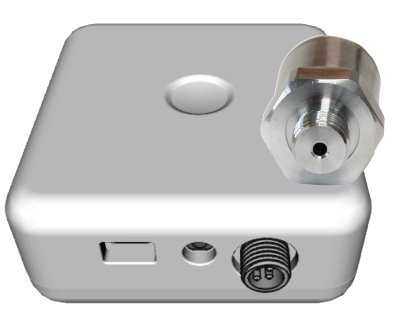
Der AQXWIE02 erkennt durch Analyse von Druckwellen im Leitungswasser den Wasserverbrauch und Wasserlecks. Er ueberwacht kontinuierlich Druck, Temperatur und Wasserverbrauch mehrmals pro Sekunde. Ein einziger Sensor genuegt fuer ein ganzes Gebaeude, da Wasser akustische Signale hervorragend uebertraegt.
Das Geraet besteht aus einem Hauptgehaeuse (IP65) fuer Signalverarbeitung und Funkkommunikation sowie einem externen Sensorkopf (IP67) mit Anschluss an das Wassernetz. Die Kommunikation erfolgt per WLAN an die Aqua-Scope Cloud-App, per MQTT oder als JSON an Smart-Home-Gateways.
Im Vergleich zum AQSWIE02 bietet der AQXWIE02:
- Wasserverbrauchsmessung via akustischer Druckwellenanalyse
- Zusaetzliche Alarme (Lange Zapfung, Klemmende Toilette, Tropfender Wasserhahn, Strange Flow)
- Automatische 24h-Kalibrierung
- Empfindlichkeit: <250 ml/min mit Druckminderer, <2000 ml/min ohne
Hauptmerkmale:
- Druckwellen-Analyse: Leckage + Verbrauch
- Externer Sensorkopf mit G1/4"-Anschluss
- T-Stueck fuer 3/8"-Eckventile beigelegt
- Kabelgebundener Flutsensor (3,5 mm Klinkenbuchse)
- Nachruestmotor-Unterstuetzung via LoRa (Auto-Absperrung)
- Bis zu 10 kabellose Flutsensoren
- App + MQTT + JSON Webhook
- USB-C (5V/1A) oder ER26500 Batterie
- IP65 (Hauptgeraet) / IP67 (Sensorkopf)
Installation
Der Sensorkopf hat ein G1/4"-Gewinde (europaeisch-metrisch) und passt damit in alle Revisionsoeffnungen des Wassernetzes, z.B. an Rueckflussverhinderern, Hauptabsperrhahnen oder Druckminderern.
Montage an einer Revisionsoeffnung
Schrauben Sie den Sensorkopf direkt in eine vorhandene 1/4"-Revisionsoeffnung.
Montage am Eckventil
Wenn keine Revisionsoeffnung vorhanden ist, kann der Sensorkopf am Eckventil montiert werden:

- Wasser am Eckventil absperren
- Panzerschlauch am Eckventil mit dem mitgelieferten 3/8"-Maulschluessel loesen
- Mitgeliefertes T-Stueck zwischen Eckventil und Panzerschlauch einsetzen
- Panzerschlauch am T-Stueck wieder befestigen
- Sensorkopf in den Abgang des T-Stuecks einschrauben
- Wasser aufdrehen und alle Verbindungen auf Dichtheit pruefen
Beim erneuten Befestigen des Panzerschlauchs unbedingt den Panzerschlauch gegenhalten, damit er sich nicht verdreht. Ein verdrehter Panzerschlauch kann zu Leckagen fuehren!
Der Sensorkopf muss immer nach einem eventuell vorhandenen Druckminderer installiert werden. Der Druckminderer verbessert die Genauigkeit der Verbrauchsmessung erheblich.
Verbindung und Kommunikation
Die WLAN-Einrichtung erfolgt ueber die Konfigurationsseite des Geraetes (SSID "Scope"). Eine ausfuehrliche Schritt-fuer-Schritt-Anleitung finden Sie unter WLAN-Anbindung.
Fuer erfahrene Anwender
Neben der Aqua-Scope App stehen weitere Kommunikationsoptionen zur Verfuegung, die ueber Konfiguration -> Kommunikationsoptionen in der App aktiviert werden:
- MQTT -- Integration in MQTT-basierte Systeme
- Home Assistant -- Automatische Erkennung im Dashboard
- JSON Webhook -- Eigener Webdienst mit HTTP POST
- Modbus IP -- Industrielles Protokoll (TCP Port 502)
- Lokaler Webserver -- Direkter Zugriff per Browser im LAN
Der lokale Webserver und Modbus IP sind nur im Netzteilbetrieb verfuegbar, nicht im Batteriemodus.
Geraetenutzung
Hardware
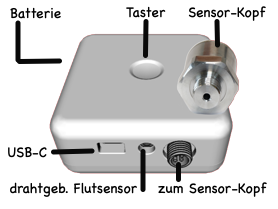
- USB-C Anschluss: Nur zur Stromversorgung (beiliegendes KTEC-Netzteil empfohlen -- guenstigere Alternativen koennen Stoerungen erzeugen, die die Sensorqualitaet beeintraechtigen). Wasserdichter Stecker.
- Externer Sensorkopf: Wasserdichter Gewindeanschluss zum Hauptgeraet (80 cm Kabel)
- 3,5 mm Klinkenbuchse: Wasserdichter Anschluss fuer zusaetzlichen externen Flutsensor (beigelegt)
- Batteriefach (Rueckseite): Schraubverschluss mit Gummidichtung zum Wasserschutz
Tastenbedienung
| Aktion | Funktion |
|---|---|
| 1x kurz druecken | Aufwecken / Statusmeldung senden |
| 2x kurz druecken | Aktiven Alarm quittieren |
| 3x kurz druecken | Derzeit nicht belegt |
| 5 Sek. halten (direkt nach Einschalten) | Werksreset |
LED-Anzeige
| LED | Bedeutung |
|---|---|
| Gelb/Mehrfarbig blinkend | Boot-Vorgang |
| Rot/Gruen blinkend | Auslieferungszustand -- Verbindungsbereit, Webserver und Bluetooth aktiv |
| Blau oder Gruen langsam atmend | Netzwerk und externe Stromversorgung verbunden, Normal-/Standby-Betrieb |
| Rot blinkend | Aktiver Alarm mit externer Stromversorgung |
| Aus | Nicht angeschlossen oder Batteriebetrieb (Schlafmodus) |
Messwerte und Alarme
Das Geraet misst Wasserdruck, Temperatur und Verbrauch mehrmals pro Sekunde und uebertraegt die Daten alle 15 Minuten per WLAN.
10 Alarmtypen (3 zusaetzlich gegenueber AQSWIE02):
| Alarmtyp | Maske | Beschreibung |
|---|---|---|
| 1 -- Flutsensor | 0x001 | Kabel- oder Funksensor erkennt Wasser |
| 3 -- Lange Zapfung | 0x004 | Wasser fliesst zu lange (Parameter 10, Standard: 900 Sek. = ~15 Min.) |
| 4 -- Unterdruck | 0x008 | Wasserdruck unter unterem Schwellenwert (Parameter 7) |
| 5 -- Klemmende Toilette | 0x010 | Dauerhafter minimaler Fluss erkannt |
| 6 -- Ueberdruck | 0x020 | Wasserdruck ueber oberem Schwellenwert (Parameter 6) |
| 7 -- Tropfender Wasserhahn | 0x040 | Tropfender Wasserhahn erkannt |
| 8 -- Pipe-Check Mikroleckage | 0x080 | Pipe-Check hat Mikroleckage erkannt |
| 10 -- Strange Flow | 0x200 | Ungewoehnliches Flussmuster erkannt |
| 14 -- Sensor nicht verbunden | 0x2000 | Sensorkopf vom Hauptgeraet getrennt |
| 15 -- Sensor nicht am Wasser | 0x4000 | Sensorkopf verbunden, aber kein Kontakt mit Druckwasser |
Kalibrierung
Um die akustischen Signale im Wasser korrekt auswerten zu koennen, muss der Sensor kalibriert werden. Dies geschieht automatisch innerhalb von ca. 24 Stunden nach der Verbindung mit dem Funknetzwerk. Waehrend dieser Zeit koennen die Verbrauchswerte ungenau sein, insbesondere wenn der Wasserdruck erheblich schwankt.
Die automatische Kalibrierung benoetigt bis zu 24 Stunden. Waehrend dieser Zeit koennen die Verbrauchswerte ungenau sein. Die Kalibrierung kann jederzeit ueber die App oder per Tastendruck (3x Klick) neu gestartet werden.
Auswirkung eines Druckminderers
| Funktion | Mit Druckminderer | Ohne Druckminderer |
|---|---|---|
| Druckueberwachung | Volle Funktionalitaet | Volle Funktionalitaet |
| Temperaturueberwachung | Volle Funktionalitaet | Volle Funktionalitaet |
| Flutsensor-Alarm | Volle Funktionalitaet | Volle Funktionalitaet |
| Frostalarm | Volle Funktionalitaet | Volle Funktionalitaet |
| Ueberdruck-Alarm | Volle Funktionalitaet | Volle Funktionalitaet |
| Pipe-Check (Mikroleckage) | Volle Funktionalitaet | Volle Funktionalitaet |
| Verbrauchsalarm | Eingeschraenkte Praezision | Eingeschraenkte Praezision |
| Verbrauchsmessung | Empfindlichkeit <250 ml/min | Empfindlichkeit <2000 ml/min |
| Klemmende Toilette | Eingeschraenkte Praezision | Eingeschraenkte Praezision |
Kommunikation mit externen Geraeten
- Nachruestmotoren: Kopplung via LoRa (intern), QR-Code-Pairing ueber die App
- AUF/ZU-Steuerung: ueber App oder Alarm-Automatik
- Timer: zeitgesteuerte Absperrung
- Flutsensoren: bis zu 9 kabellose Sensoren (FLOLWE02)
Pipe-Check
Der Pipe-Check ermittelt Mikroleckagen im Wassersystem. Dazu schaltet der Motor das Wasser fuer ca. 240 Sekunden ab und die Druckveraenderung im Wassersystem wird analysiert. Einfluss auf die Messung haben Temperaturschwankungen, Ausgasungen und eben auch Mikroleckagen.
Die Empfindlichkeit ist sehr hoch -- ab ca. 1 Tropfen pro Sekunde wird eine Leckage erkannt (Empfindlichkeit: <4 ml/Stunde). Die Sensibilitaet kann in der App angepasst werden.
Der Schwellenwert muss hoeher gewaehlt werden, wenn ein groesserer Warmwasserpuffer (Boiler) vorhanden ist, da die thermische Ausdehnung des Wassers die Druckmessung beeinflusst.
Alarmverhalten: In den Werkseinstellungen fuehrt erst der 5. aufeinanderfolgende Alarm zu einer echten Benachrichtigung des Anwenders. Dieser Wert kann in der App von 0 (sofort alarmieren) bis 10 geaendert werden.
Manueller und automatischer Pipe-Check:
Der Pipe-Check kann in der App manuell gestartet werden. Empfohlen ist eine regelmaessig automatische Durchfuehrung ueber eine zeitgesteuerte Aktion in der App (frei waehlbare Uhrzeit und Wochentage).
Fuer den Pipe-Check ist ein Nachruestmotor (z.B. BVSLWE02 oder KFRLWE02) erforderlich, der das Wasser vor dem Test automatisch absperrt.
Batteriebetrieb
Das Geraet wird mit einer ER26500 Batterie (Bobbin-Cell, Groesse C, Lithium-Thionylchlorid) betrieben, die hinten im Batteriefach eingelegt wird.
- Lebensdauer: 8--10 Jahre mit Druckminderer, ca. 4 Jahre ohne
- Die Batterie kann auch bei gleichzeitigem Netzanschluss (USB-C) als Backup dienen
- Die Stromquelle beim Einschalten bestimmt den Betriebsmodus
Im reinen Batteriebetrieb:
- LEDs am Geraet deaktiviert (Status-LED bleibt dunkel)
- Keine akustische oder visuelle lokale Alarmanzeige
- Langsame Befehlsverarbeitung (bis zu 1 Stunde statt ~10 Sekunden im Netzmodus)
- Kann keine Alarme von externen kabellosen Flutsensoren empfangen
- Sensordaten werden stuendlich statt alle 15 Minuten uebertragen
- LoRaWAN-Geraete versuchen nur einmal einen JOIN
Konfigurationsparameter
| Nr. | Parameter | Standard | Beschreibung |
|---|---|---|---|
| 4 | Ventilmotor-Aktion | -- | Bitmap: definiert, welche Alarmtypen die Motor-Absperrung ausloesen |
| 5 | Normdruck | -- | Informativ: Einstelldruck des Druckminderers (mBar) |
| 6 | Ueberdruck-Schwelle | 8000 mBar | Alarm, wenn der Messwert den eingestellten Wert 60 mal überschreitet (Messfrequenz werkseingestellt 125 ms, konfigurierbar) |
| 7 | Unterdruck-Schwelle | 1 mBar | Alarm, wenn der Messwert den eingestellten Wert 60 mal unterschreitet (Messfrequenz werkseingestellt 125 ms, konfigurierbar) |
| 8 | Verbrauchs-Umrechnung | 1000 | Umrechnungsfaktor Geschwindigkeit zu Litern |
| 10 | Lange-Zapfung-Schwelle | 900 s | Flussdauer, ab der ein Alarm ausgeloest wird (~15 Min.) |
| 13 | Pipe-Check Dauer | 240 s | Testdauer fuer Mikroleckage-Erkennung |
| 14 | Pipe-Check Abbruch | 200 mBar | Einmaliger Druckanstieg, der den Test abbricht |
| 15 | Pipe-Check Alarm | 30 mBar | Druckabfall-Schwellenwert fuer Leckerkennung |
| 18 | Temperatursensor-Offset | 0 | Linearer Offset in 1/10 °C |
Sensorwerte (Uplink)
| Index | Modbus Register | Messwert | Einheit |
|---|---|---|---|
| 0 | 100/101 | Betriebszeit | Stunden |
| 1 | 102/103 | Temperatur | 1/10 °C |
| 2 | 104/105 | Batteriespannung | mV |
| 3 | 106/107 | Batterieverbrauch | mAs |
| 4 | 108/109 | Wasserdruck | mBar |
| 5 | 110/111 | Wasserverbrauch seit letzter Abfrage | ml |
| 6 | 112/113 | Wasserzaehlerstand | Liter |
| 7 | 114/115 | Ventilstatus | 1=offen, 0=geschlossen |
Lieferumfang
- Leckageschutz-Monitor (Hauptgeraet, ohne Batterie)
- Aqua-Scope Sensorkopf mit 80 cm Kabel
- 3/8"-T-Stueck fuer Eckventil-Montage
- Flutsensor mit 130 cm Kabel und Klinkenstecker
- USB-C Stromkabel und Netzteil
- 19-mm-Schraubenschluessel fuer T-Stueck-Montage
Trinkwasserrichtlinie EU 98/83/EG
Das T-Stueck mit Trinkwasserkontakt entspricht den europaeischen Normen. Material: CW509L, gelistet im Umweltbundesamt (UBA) Register zugelassener Werkstoffe (Ausgabe 14. Mai 2020, Abschnitt 2.1.3.1).
Technische Daten
| Parameter | Wert |
|---|---|
| SKU | AQXWIE02 |
| Stromversorgung | USB-C 5V/1A (extern) |
| Batterie | Bobbin Cell C ER26500 (Lithium-Thionylchlorid) |
| Prozessor | ESP32-WROOM_32E (Xtensa Dual Core 32-bit, 240 MHz, 520 KB RAM) |
| WLAN | IEEE 802.11 b/g/n (2,4 GHz) -- Aqua-Scope Cloud, MQTT, JSON |
| Bluetooth | 5 LE (UART-Profil) |
| LoRa | 868--869 MHz, 4 dBm (fuer Motorsteuerung) |
| Drucksensor | 0--10 bar (0--1000 kPa), Ueberlast 150% |
| Anschluss | G1/4" Innengewinde, I2C |
| Genauigkeit | <1% dynamisch |
| Empfindlichkeit | <250 ml/min (mit Druckminderer), <2000 ml/min (ohne) |
| Pipe-Check Empfindlichkeit | <4 ml/Stunde |
| Temperatursensor | Integriert im Sensorkopf |
| Abmessungen (Hauptgeraet) | 91 x 91 x 30 mm |
| Gewicht (Hauptgeraet) | 105 g |
| Gewicht (Sensorkopf) | 140 g |
| Schutzgrad | IP65 (Hauptgeraet) / IP67 (Sensorkopf) |
| Bedienelemente | 3-Farben-LED, Einzeltaster |
| Betriebstemperatur | -20 bis +50 °C |
| Lager-/Transporttemperatur | -65 bis +125 °C |
| Relative Luftfeuchtigkeit | 0--90% |
| Funkemissionen (WLAN) | 2,4 GHz Breitband (EN 300 328) |
| Funkemissionen (LoRa) | 868--869 MHz, 4 dBm (2,5 mW) |