RANWIE01 -- Rain Gauge (WLAN)
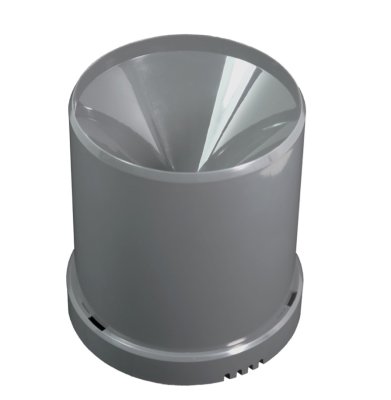
Product Description
This rain sensor measures the amount of rainfall at the sensor location in millimeters of water column using a tipping bucket mechanism and transmits the quantity within a configurable interval (default: 15 minutes) with an accuracy of 0.5 mm water column. In addition, the temperature is transmitted.
The measurement data is sent via WLAN to the Aqua-Scope Cloud, via MQTT, or as JSON to smart home gateways. The sensor is powered by two AAA batteries (approx. 2 years battery life). In the event of heavy rain exceeding 20 liters/hour, an alarm is triggered. Both the heavy rain threshold and the measurement interval are configurable.
Key Features:
- Tipping bucket principle, 0.5 mm resolution
- Heavy rain alarm at > 20 l/h (threshold configurable)
- Configurable measurement interval (default: 15 min.)
- WLAN + App / MQTT / JSON Webhook
- Power supply: 2 x AAA batteries (approx. 2 years battery life, bevigor included)
- Low battery warning via radio
- Protection rating: IP55
Setup and Installation
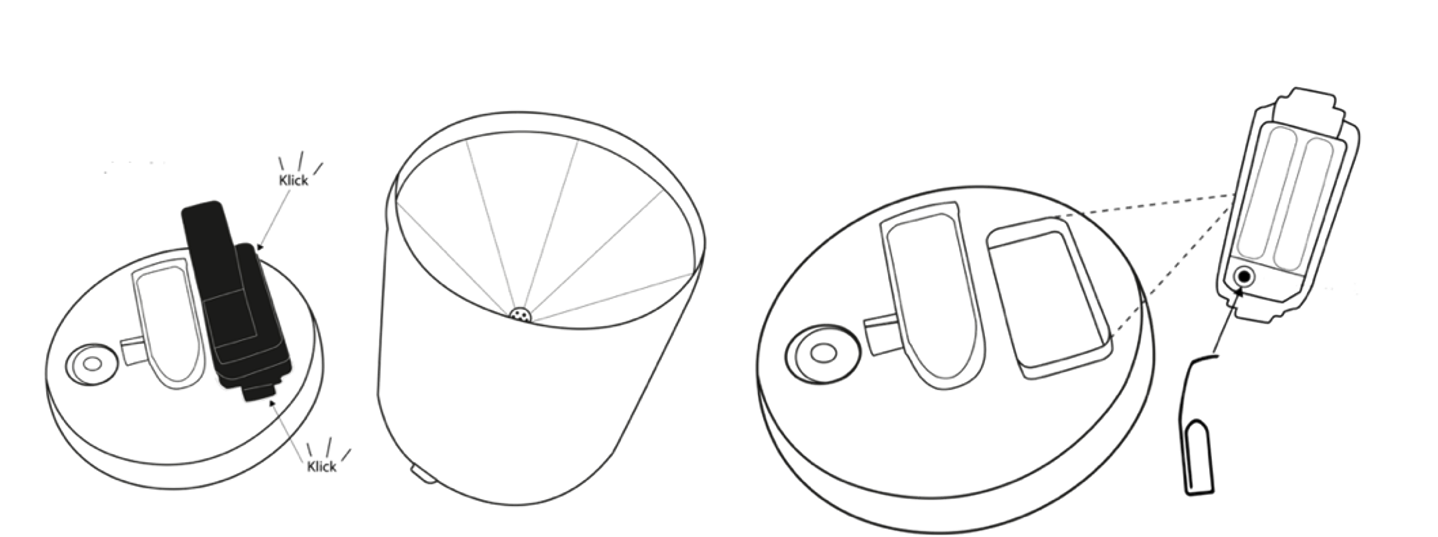
- Open the cover by turning it counterclockwise.
- Remove the electronics block -- held in place on both sides by small clips.
- Inside the electronics block you will find: battery compartment, single button, red/green LED next to the button.
- Insert batteries (2 x AAA).
- Choose a suitable location:
- Clear view of the sky
- No obstacles that could affect precipitation measurement
- Sufficient WLAN coverage (test with your mobile phone)
- Mount the sensor securely on an elevated surface (mast or wall).
- Level the sensor horizontally -- use the spirit level in the base (viewing glass) for verification.
- Secure with the 3 included screws and wall plugs (prevents wind damage).
The device should be placed at an open location without obstacles that could affect the precipitation measurement. Ensure that sufficient WLAN coverage is available at the chosen location.
Incorrect alignment will lead to inaccurate or missing measurement values. Use the built-in spirit level in the base.
Connection and Communication
The WLAN setup is performed via the device's configuration page (SSID "Scope"). A detailed step-by-step guide can be found at WLAN Connection.
Factory Reset: Press and hold the button for 4 seconds while inserting the batteries. The red LED blinks four times (as a counting aid). Release when the LED flashes red three times.
Connection Process (4 Steps):
- The device creates a WLAN network with the name "Scope" (no password required)
- Connect to this network via smartphone or PC
- Open a browser:
http://scope.localorhttp://192.168.4.1 - Available WLAN networks are displayed -- enter the WLAN password and email address, then you will be redirected to the Aqua-Scope app at https://app.aqua-scope.com
For Advanced Users
In addition to the Aqua-Scope app, further communication options are available and can be activated via Configuration -> Communication Options in the app:
- MQTT -- Integration into MQTT-based systems
- Home Assistant -- Automatic discovery in the dashboard
- JSON Webhook -- Custom web service with HTTP POST
- Modbus IP -- Industrial protocol (TCP Port 502)
- Local Web Server -- Direct access via browser on the LAN
The local web server and Modbus IP are only available in mains-powered mode, not in battery mode.
Sensor Data
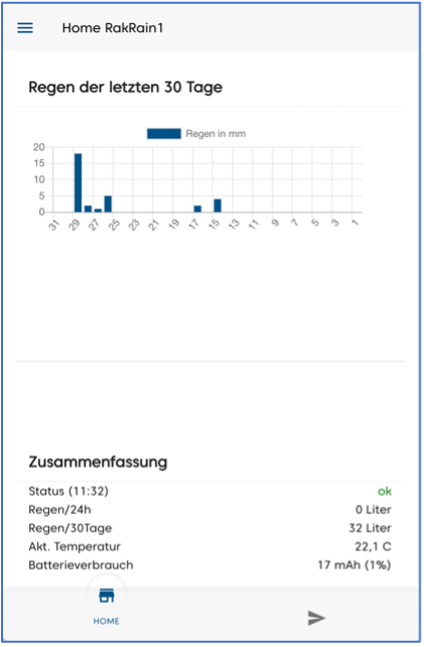
The sensor measures rainfall in millimeters of water column in a 15-minute interval.
Transmission Behavior:
- Rain detected: Measurement is sent immediately via WLAN
- No rain: Status report only every 6 hours (rain=0 + additional data)
- Heavy rain alarm: At > 20 l/h, an alarm message is sent immediately
- All clear: When precipitation falls below the heavy rain threshold, this is also reported
MQTT/JSON Format:
{
  "uptime": "1",
  "temperature": "200",
  "rainlevel": "0",
  "battery": "100",
  "raintotal": "5"
}
Data Fields:
| Field | Description |
|---|---|
uptime | Hours since last battery change |
temperature | Temperature in 1/10 degrees Celsius |
rainlevel | Measured rainfall in the last interval in units of 0.5 mm water column (value × 0.5 = mm) |
battery | Consumed battery capacity since last change (mAs) |
raintotal | Total measured rainfall since last battery change in units of 0.5 mm water column (value × 0.5 = mm) |
Configurable Parameters:
| Parameter | Description | Default |
|---|---|---|
| 29 | Measurement interval in seconds. Sends status only if ≥ 0.5 mm rain detected. | 900 (= 15 min.) |
| 27 | Zero-report multiplier. Sensor sends zero report after x × measurement interval. | 24 (= 6 hours) |
Local Operation
The electronics capsule contains: two batteries, an opening with a button, and two LEDs next to the button. The button is operated with a matchstick, needle, paper clip, or small screwdriver.
LED Signals
| Signal | Meaning |
|---|---|
| Red/green blinking | Factory state -- own WLAN "Scope" active |
| Red blinking (4x) during battery insertion | Counting aid for factory reset (hold for 4 sec.) |
| Three red flashes | Factory reset completed |
| Brief LED flash | Waking from deep sleep |
Button Functions
| Action | Function |
|---|---|
| Hold 4--5 sec. (during battery insertion) | Factory reset -- WLAN settings cleared, parameters reset |
| Press 1--2 sec. | Wake from deep sleep + send status report (when WLAN is connected) |
Batteries
We recommend AAA lithium batteries:
- Energizer Ultimate Pro -- premium option with longer battery life
- bevigor LFB AAA -- more cost-effective alternative
For a detailed analysis of battery life under various conditions, see the Battery Life Report (PDF).
Scope of Delivery
- Rain gauge (main unit)
- 3 x mounting screws + wall plugs
- 2 x AAA batteries (bevigor)
Technical Specifications
| Parameter | Value |
|---|---|
| SKU | RANWIE01 |
| Processor (main) | ESP32-WROOM_32E (Xtensa Dual Core 32 Bit, 240 MHz, 520 KB RAM) |
| Co-processor | Xtensa 16 Bit Ultra Low Power RISC |
| WLAN | 2.4 GHz, IEEE 802.11 b/g/n |
| Rain resolution | 0.5 mm or 0.5 l/m3 |
| Measurement period | 15 minutes |
| Temperature accuracy | +/- 3 °C |
| Temperature range | -25 °C to +50 °C |
| Status report | Every 6 hours (when no rain) |
| Heavy rain alarm | From 15 l/h |
| Controls | 3-color LED, single button |
| Batteries | 2 x AAA, 2.2--3.6 V |
| Protection rating | IP55 |
| Operating temperature | -20 °C to +50 °C |
| Storage/transport temperature | -65 °C to +125 °C |
| Relative humidity | 0--90 % |
| Dimensions (device) | 132 x 132 x 139 mm |
| Dimensions (packaging) | 140 x 140 x 150 mm |
| Weight | 219 g |
| Radio emissions (WLAN) | 2.4 GHz broadband (EN 300 328) |